How to Create a Division Template Properly?
Article · How to create a division template
How to create a division template the right way in Hearts of Iron IV
How do you build a template that works on the front line, not just on paper? 6 steps to a top-tier division template.
Step 1. Pick the goal and the division type
The most common mistake in HoI 4 is assembling a template without picking a division's job. With no job set, you cannot tell how much infantry to add, whether you need artillery, or whether you need tanks. The summary in the designer can look strong while the division does the wrong job on the map.
Before the first battalion, decide what this division will do most of the time. Hold the front? Attack? Sit in a port? Fight in the mountains? Each job needs its own template. One template that «holds, pushes, and sits in a port» is weaker than two built for their own jobs: cheap infantry for the line and a separate template for attacks.
Pick the division type for the job. Infantry covers the front on the cheap: rifles, manpower, a few support companies and regimental slots. Tanks and motorized infantry hit fast and hard, but they are expensive and burn fuel. Mountaineers and marines are strong on their own terrain and on landings, but numbers stay low because of the special forces cap. Cavalry suppresses resistance well on occupied land, yet in a head-on fight it is often worse than the others.
If you stuff infantry, artillery, and tanks into one division «just in case», you get an average mix: it holds worse than pure infantry, hits worse than proper tanks, and your factories work for nothing.
| Job | Which type to take | What to avoid |
|---|---|---|
| Hold the front | Regular infantry: cheap or medium size | Do not put tank divisions across the whole front |
| Attack and push a tile | Tanks, motorized infantry, or large attack infantry | Do not spread this template across the whole front |
| Mountains, marsh, naval landing | Special forces for the terrain | Do not expect regular infantry to walk that terrain easily |
| Guard a port and weak stretches | Very cheap infantry | Do not keep expensive divisions in a port |
| Occupation | Cavalry | Do not chase partisans with combat infantry for the whole war |
Look at your own country. A small country with no factories should not copy a Soviet template at 36 combat width: there is nothing to build it with. A large country should not live the whole war on one cheap infantry template at width 10. The right template fits both the job and your industry. Next: lock in your combat width.
First pick the division's job: hold the front, attack, sit in a port, fight in the mountains, or hold occupied land. Take the type for that job: infantry holds the front on the cheap, tanks and motorized infantry break the line, special forces handle rough terrain.
One template for everything is usually weaker than two simple ones — cheap infantry for the line and a separate shock template. Keep your country in mind too: your factories have to carry the template.
Step 2. Pick combat width
Combat width in HoI 4 shows how much space a division takes up in one battle. Every tile has a limit: 70 on plains, 60 in forest, 50 in mountains and marsh, 80 in urban terrain. Only divisions whose combined combat width fits the limit join the fight properly at the same time. The rest wait in reserve.
If the combined width goes over the limit, divisions in the battle take a penalty. Roughly −1% effectiveness for each 1% over, capped at −33%. Example: the plains limit is 70 and you attack with three divisions at 30 each — that is 90. The overflow is large, and part of your strength burns up in the penalty. It feels like «one more division will help», but the fight actually gets weaker.
Only combat battalions in the middle of the designer give combat width, the 5-by-5 grid. An infantry battalion and most tank battalions take 2 combat width. Line artillery takes 3 combat width. Support companies on the right and regimental support at the bottom add no combat width. Engineers and one more artillery battalion are different things: a company adds strength without extra width, while artillery in a battalion both adds strength and takes up space in battle.
There is no single correct width for the whole game. There are values that split common tile limits neatly. For defense I usually take 10, 14, 18 or 20 CW. For attacks — 15, 20 or 36 CW. You need 25 CW if you fight in mountains or marsh with no mountaineers or marines: two such divisions exactly fill the terrain's own 50 limit. Avoid building widths like 21 or 23 just because «it still fits»: fewer divisions than you planned will then enter the tile without a penalty. I put this table together from strong players' experience and my own.
| Combat width | When to take it |
|---|---|
| 10 | Cheap defense, ports, a small country with no factories. 7 such divisions fit the 70 limit on plains. |
| 14–15 | Flexible infantry if the country can already hold the front and attack now and then. 15 sits nicer in forest: 4 divisions in the 60 limit. |
| 18–20 | Defense of key tiles for a large country. No need to put this template on every weak stretch of the map. |
| 25 | Mountains and marsh without special forces: two divisions fill the 50 limit. |
| 36 | A large attack once factories already carry the cost. On plains two divisions take 72 against a 70 limit — almost exact, a third no longer fits without a penalty. |
Pick the combat width first, then add battalions to hit it. If you keep adding «more infantry, more artillery» with no target, you easily land on 23 and get a template that sits badly on both plains and forest.
For example, playing Germany I held off every French attack on the border in 1940 with a single infantry army at 14 CW. Next: set organization for the type.
Combat width is how much space a division takes in battle, and each terrain has its own limit: plains 70, forest 60, mountains and marsh 50, urban 80. Going over the limit cuts effectiveness: minus 1% for each 1% over, capped at minus 33%.
Only line battalions give combat width: infantry and tanks 2 each, line artillery (in battalions) 3, while support companies and regiments add none. So pick the combat width first — 10/14/18/20 for defense, 15/20/36 for attacks, 25 for mountains — and only then fill in battalions to match.
Step 3. Set organization for the type
A division in HoI 4 has two different pools. Strength is men and equipment: how much the division can lose before it falls apart. Organization is how long it can stay in battle without breaking.
When organization drops to zero, the division retreats, even if it still has plenty of strength. High soft attack with low organization lands a strong first punch, and a short while later the division is already leaving the battle.
Division organization is the average across all combat battalions, companies, and regiments, not a sum. Infantry has high organization, so it pulls the average up. Artillery, SPGs, and tanks have lower organization, so they pull it down.
Each new line artillery battalion almost always adds damage and lowers organization. Support companies and regiments matter too, but the lineup in the middle of the designer sets organization the most.
I check myself against these targets. This is not a hard law, just a floor below which a template usually fails at its own kind of fight.
| Template type | Organization | If lower |
|---|---|---|
| Front-line defense infantry | 45–50 and up | Divisions retreat fast, and you have to pack even more of them onto the front |
| Attack infantry | around 40 and up | The first hours go well, then divisions retreat without taking the tile |
| Tank and mixed divisions | 30–40 | The attack dies halfway, and the tile never falls |
If organization is too low, raise it with composition. Add infantry. In a tank template, add motorized infantry or mechanized: they pull the average up. Drop extra line artillery and SPGs if you already have enough damage. Take off the regimental «Heavy Weapons Company» and «Infantry Guns» if organization drops hard after them and support equipment is not coming out in the numbers you need. In tanks you almost never fix organization with another tank battalion — you fix it with infantry next to the tanks, motorized or mechanized (watch the division's speed).
Do not chase organization without limit either. Infantry at 70 organization with almost no soft attack will stand for a long time and push nobody. Tanks have no reason to aim for infantry-level 50 organization: breakthrough and attack matter more to them, and 30–40 organization is enough. Next: decide if the division needs armor.
Organization is how long a division stays in battle: at zero it retreats, even if its strength is still intact. It is an average across line battalions: infantry pulls it up, while artillery, SPGs, and tanks pull it down.
Hold this target: defense infantry 45–50+, attack infantry around 40, tank divisions 30–40. Low organization is fixed with infantry (watch the division's speed) next to the tanks and by dropping extra artillery, not with a new tank battalion.
Step 4. Adding armor
Armor helps: the battle runs on different rules than a regular infantry fight.
In the armor calculation the most armored battalion does a lot of the work, and the rest counts as a division average. That is why top players put a single «Medium SP Anti-Air» battalion into infantry: a cheap hull with armor maxed out — and armor then counts for the whole division. In HoI 4 that is cheaper than dragging a medium tank along just for armor.
«Medium SP Artillery» in infantry is a different case: it brings lots of soft attack to a large attack template, not cheap armor for the whole line.
If enemy piercing beats your armor, the bonus is gone. You spent factories on vehicles, and they still hit you like regular infantry. Regular infantry with no armor and no anti-tank holds badly against tanks. Add armor when you can actually produce it and when the enemy has no mass piercing yet.
When to add armor
- Factories already make SP Anti-Air or tanks in the numbers you need
- You must hold key tiles you cannot give away cheaply
- This is an attacking division that has to survive return fire
When not to add armor
- A small country copies a large armored template with no tank factories
- Ports and weak stretches of the front — cheaper to cover with infantry numbers
- The enemy already fields lots of anti-tank and tanks with high piercing
Check the same thing on your own attacks. If your tanks cannot pierce enemy armor, damage stays weak. Before an offensive, check: either the template has enough piercing, or that template should stay away from enemy armor. Time to add support companies and regiments.
Armor works only while it is not pierced: then you take less damage and hit harder yourself. One «Medium SP Anti-Air» battalion with upgraded armor often gives armor to the whole infantry division — cheaper than a medium tank.
Skip armor if factories cannot keep up with production or the enemy already pierces in bulk. On attacks, check piercing too: if your tanks cannot pierce the enemy, there will be no damage.
Step 5. Companies, regiments, factories, and army experience
Once the type, combat width, organization, and the armor call are set, you add the extras. Support companies sit on the right, five at most. They give bonuses and do not raise combat width. Regimental support shows up under a battalion column once that column already holds at least three battalions.
New columns and company slots cost army experience. Changing the template on divisions that are already trained costs army experience too, plus manpower and equipment to refill. While stockpiles run short, divisions on the map fight understrength: the template in the designer is full, but rifles or guns are missing in battle, and that hurts.
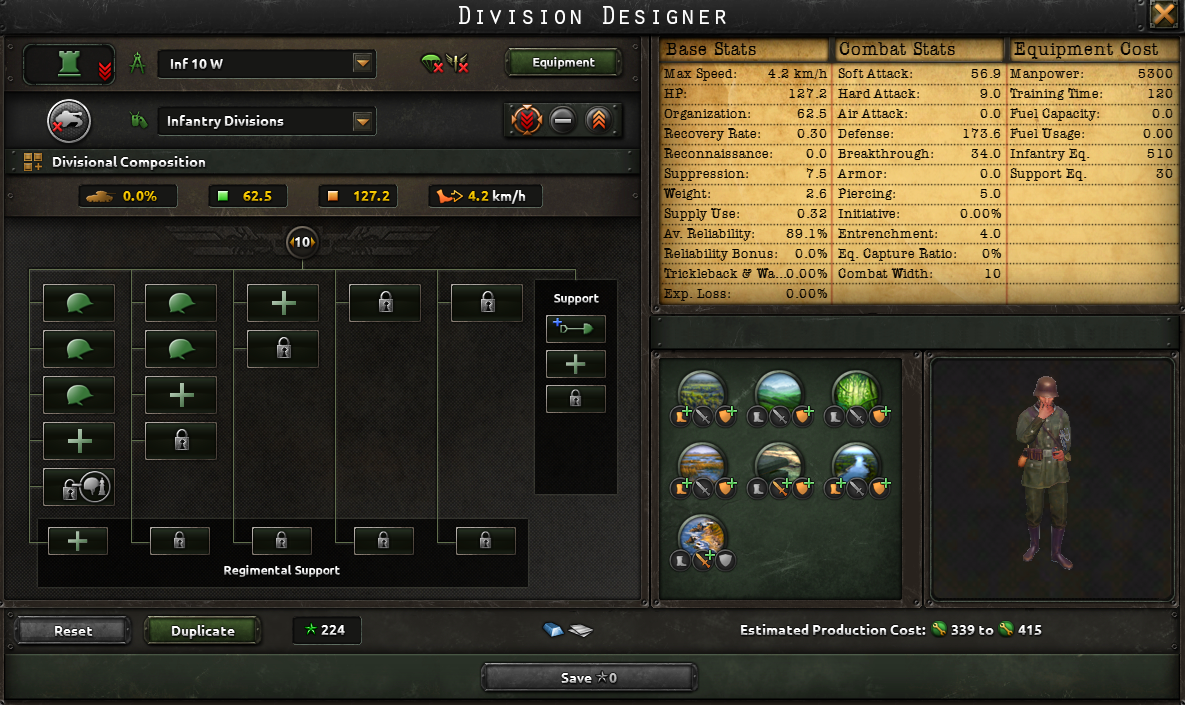
No need to fill all five slots at once. «Engineer Company» almost always comes first: better entrenchment on defense, easier attacks in forest and across rivers, slightly better against forts. Then look at the job. «Support Artillery» is often enough. If the enemy bombs hard — «Support Anti-Air». If the enemy fields many tanks — «Support Anti-Tank», but only while organization stays fine. «Field Hospital» eats trucks and support equipment: on the cheapest infantry of a small country it is often missing, on a large attack division it already pays off. Add «Cavalry Recon Detachment» if organization allows. Never drop engineers just to fit recon.
The regimental «Heavy Weapons Company» and «Infantry Guns» make the division stronger, but they lower organization and eat infantry equipment and support equipment. If organization drops too low after them or factories cannot keep up with support equipment — take the regiments off. A simple full division fights better than an expensive template that stays understrength on the map.
Most of the time support companies matter more than regiments. If you need to drop something, for organization for example, start with the regiments.
After each change, look at more than attack in the summary. Watch supply consumption, speed and equipment cost per division, and other stats. A large template with no trucks and fuel on a long front fights weaker than on paper. If factories cannot even cover current rifles, a new expensive template only grows the production queue. One short check left.
A solid default for an average infantry division: Engineer Company, Recon Company, Support Artillery.
For large tank divisions: Assault Engineer Company, Support Artillery, Light Armored Recon Company, Medium Flame Tank Company, Logistics Company.
You can pick other companies that fit the job better. This is just a starting list for when you do not know where to begin.
Support companies sit on the right, five at most, and they add no combat width — unlike line battalions. Regimental support opens under a column that already holds three battalions.
Start with «Engineer Company», and take the rest for the job: anti-air against bombing, anti-tank against tanks, a hospital only if you have the trucks. New slots and template changes cost army experience, and a half-empty stockpile means half-empty divisions on the map.
Step 6. Check before you produce
Before saving the template, run through a short list. It takes a minute, and you will not have to rebuild the whole army mid-war.
- The job is clear: defense infantry holds the front, the attack template is not spread across the whole map.
- Combat width fits the terrain where these divisions will stand most of the time.
- Organization sits in its type's target range.
- If there is armor — not everyone pierces it yet. If there is no armor — that is a deliberate choice.
- Companies match the job, not the fact that there are five slots. Regiments can come off if organization or equipment cannot keep up.
- Factories, manpower, trucks, and army experience cover not just one division, but the number you actually plan to field.
If any point fails, fix the template now. Half a year into the war, changing the lineup on a hundred divisions takes time, and until then they will stand without equipment.
Before saving, check the template against 6 points: the division's job is set, combat width fits the terrain, organization meets its type's target, armor is either on or consciously skipped, companies and regiments fit the job, and factories, manpower, and army experience cover it.
The check takes a minute; rebuilding a hundred divisions mid-war takes months. If even one point fails, fix the template right away, before divisions end up without equipment.
Common beginner mistakes
- One template for the whole war. Holding the front, attacking, guarding a port, and fighting in the mountains need different lineups. Two or three templates per campaign is enough. No need to copy ten at once.
- Lots of attack and too little organization. The division hits hard at the start of the fight and retreats fast. It shows on offense: the tile never falls.
- Ignoring combat width. Three divisions at 30 on plains with a 70 limit take a penalty. More divisions in battle does not mean stronger.
- Armor with no production. A tank or SP Anti-Air goes into the template, factories cannot keep up, divisions sit on the map without vehicles, and the enemy pierces the armor anyway.
- All five companies on the very first template. Army experience runs out, equipment is not produced, divisions come out understrength.
- Changing the template with empty stockpiles. Every division on that template starts pulling the new lineup. Without rifles and manpower they fight weaker until they reinforce.
- Copying a big country's template while playing a small one. The USSR can field a large division at width 36. A small country often cannot. The right template is the one you can produce.
Beginners usually make the same mistakes: one template for everything, lots of attack with low organization, and width that misses the tile limit. Armor with no factories, all five companies at the start, and template changes with empty stockpiles belong here too.
A separate mistake is copying a major's large template as a small country with no industry. The rule is simple: the template must do its job and roll out of your own factories.
Bottom line
A good template in HoI 4 is built in order. First the division's role and job, then the type. Then combat width for the terrain where it will fight. Then organization in its type's target range: higher on infantry, 30–40 is fine on tanks as long as the division does not retreat right away. Armor gives a strong bonus if it is not pierced and if factories actually build it. Support companies add strength with no combat width. Drop regimental support if organization falls or support equipment runs short. If the division does its job and you can produce it — the template is built right, even when the numbers in the summary are not the biggest.
Build the template in order: role and type, then width for the terrain, then organization on target, then armor and companies. Drop regiments if organization or support equipment falls short, and always watch supply and the division's price.
If the division does its job and you can produce it — the template is done, even if the summary numbers are not maxed out.