How to view air combat stats?
Article · Air combat stats
How to view air combat stats in Hearts of Iron IV
Press F3, click an air region — and see how many you shot down and how many you lost. Let's look at where to find the stats, what matters in them and which numbers are considered good.
How to view air combat stats?
How do I open the stats window?
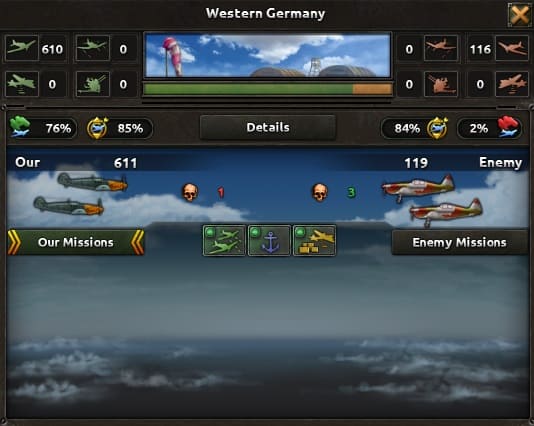
Press F3 on the keyboard or the plane icon in the bottom-right corner, then left-click the air region you need. The current stats open: how many were shot down over the last 24 hours, how many were lost, how many aircraft each side has and which missions they fly. Bombing damage is visible as well.
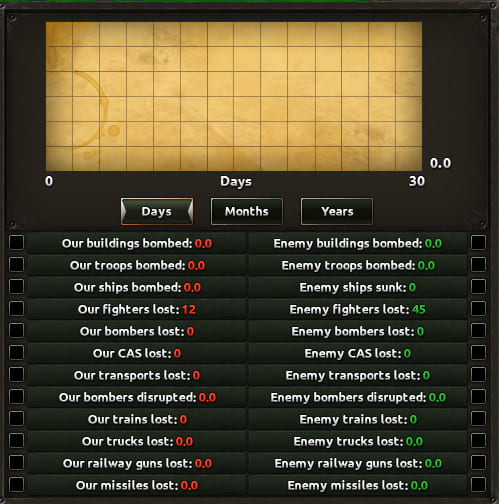
In the center of the window there is a «Details» button. It opens the region's all-time stats: how many of ours and of the enemy's were shot down overall, what damage was dealt and the like. There you can also pick entries — and a chart will be built for clarity.
Do I even need to look at it?
Actually, not really. Winning air superiority over the AI is usually not hard, so this mechanic matters most at the start — to gauge your chances of winning.
But it is interesting and useful to check: your total losses and the enemy's, damage, how strong you are. It helps with analysis too — for example, long-term aircraft comparison, since in HoI4 you can build a plane to your liking.
For example, I open it to check total losses, verify detection, see how much air the enemy has, and look at CAS damage. And if my buildings are being bombed, I check the number of enemy bombers to properly allocate my fighters. Now let's see what the stats should look like overall.
F3, click the air region. Inside — the «Details» button with all-time stats and charts.
Not required, but useful at the start and for analysis.
What should the stats look like?
What does the stats show?
The recent-hours stats show how much AA, bombers, CAS and fighters you and the enemy have in the region right now. Aircraft losses and how many planes take part in air combat are shown. Weather and the air superiority bar are visible. This is the most important window for analyzing air battles in HoI4.
The all-time detailed mode shows something different: damage to buildings, troops, navy, air, logistics losses and so on. And if you hover over fighter losses, for example, it shows what killed them. That way you can tell how many were lost to accidents rather than combat. In short, plenty to look at.
How do I improve the stats?
Say the exchanges are bad — for example, 5 of your aircraft per 1 of the enemy's. Something has to be done: that is no way to win a war. Open the detailed stats and see what exactly the fighters died from.
If from accidents — lower the accident risk. If from enemy fighters — improve the template. If the enemy destroyed a bunch of trucks — stop truck supply in the region for a while and put your fighters there.
Beyond that, game understanding decides, but logic often suffices: heavy fighter losses — change the template and take fighter buffs. The enemy is sinking your navy — put up fighters and improve AA. The enemy is bombing your troops — add AA to the division. This is exactly how strong players win in the air.
Which numbers should be good?
Benchmarks for the exchange in an air-superiority fight — your losses to the enemy's:
Exchange  |
Level |
|---|---|
| 1:1-5 | Average level |
| 1:6-10 | Good level |
| 1:11-20 | Very good level |
| 1:21+ | Top level, the peak of the game |
Benchmarks for CAS damage on ground troops:
Damage  |
Level |
|---|---|
| Less than 2 | Weak |
| 3-5 | Average |
| 6-20 | Good |
| 21-40 | Very good |
| 50+ | Top level, the peak of the game |
For comparison: top players on majors get exchanges of 1:20-40 on fighters and deal roughly 60-120 CAS attacks against enemy divisions.
The last-24-hours window (the first one): composition, losses, weather and air superiority. The detailed mode via the «details» button: damage to everything and loss causes.
Fix bad exchanges by cause: accidents, template, AA. Fighters: 1:6-10 is good, 1:21+ is top; CAS damage: 6-20 is good, 50+ is top.
What to remember
1. How to open: F3, click the air region. Inside — the «Details» button with all-time stats and charts.
2. What to look at: The last-24-hours window — composition, losses, weather and air superiority. Detailed mode — damage to buildings, troops, navy and loss causes.
3. What to do: Fix bad exchanges by cause: accidents, template, AA.
4. Which numbers: fighter exchanges 1:11-20 are a very good level, and 1:21+ is the level of top players. For CAS, 21-40 attacks in battle are a very good level, but 50+ is the level of top players.
The region stats show: losses, composition, damage and exchanges, charts by item.
Fighter exchanges 1:6-10 are good, 1:21+ are top.
CAS damage 6-20 is good, and 50+ is top level.