How to Create a Division?
Article · How to create a division
How to Create a Division in Hearts of Iron IV
Step by step: from a new template button to a division on the map. No magic — just the Division Designer, Army Experience, the training queue, and deployment.
Quick take
- First you build a template in the Division Designer, then you put it into training.
- Template edits cost Army Experience: regiment slots, support, battalions.
- To save a new template, it needs at least one combat battalion.
- A division does not appear instantly: you have to train it and deploy it.
- Changing the makeup of divisions already in the field can tank their experience hard.
Step 1. Open the Division Designer (Recruit & Deploy)
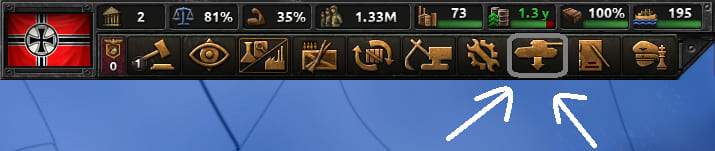
In Hearts of Iron IV you do not paint a division onto the map from scratch with the mouse. First you design a template: which battalions sit inside, which support companies, what role the name implies.
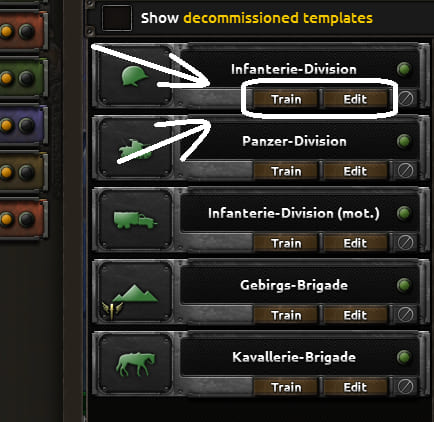
In the UI that is the Division Designer. You reach it from Recruit & Deploy — top-left of that panel, the tank icon. To edit an existing template, find the Edit button on that division’s card and click it. To make a new template, open an existing one in the designer, click the division name, and choose Create Empty. If you are short on Army Experience, you simply cannot afford heavy edits. Either bank more XP, or ship a minimal working template.
Step 2. Build the template for a role
Do not start from “perfect meta.” Start from the question: is this division for defense, breakthrough, garrison, or landings?
- Add combat battalions — without them you cannot create a new template.
- Add support companies and combat support battalions (extra regiment columns unlock once you have three battalions stacked vertically).
- Check Combat Width, Organization, Supply Use, and Training Time.
- Save the template and pay the Army Experience. If the name is already taken, the game will not allow a duplicate.
What Division Designer edits cost
Base Army Experience prices for template changes:
| Action | Base cost |
|---|---|
| Add a new battalion | 5 Army Experience |
| Add a combat support battalion | 5 Army Experience |
| Add a support company | 10 Army Experience |
A country’s Army Experience stockpile caps at 500. So rebuilding a template every day for cosmetics is a bad habit — especially early in a campaign.
Step 3. Put the division into training
A template does not walk onto the front by itself. You need a training queue: Manpower, equipment from stockpiles, and time. While the division is training, it is not yet a full force on the map. In Recruit & Deploy, find the template you want and click Train.
It is worth setting reinforcement priority right away: Reserves / Default / Elite. Elite divisions eat reinforcements faster and more greedily — great for assault templates, painful if you mark the whole army that way.
Step 4. Deploy onto the map
Once training hits the threshold you need, you deploy the division. The minimum deployable training level is below “ideal”: you can push out a still-Green division early if the front is on fire. I only do that when I am spamming divisions for numbers, or when the line is cracking. In a quiet phase, finish training.
Terminology reminder: a template is the blueprint in the designer; a division is the instance on the map or in the queue. “Create a division” in HoI4 almost always means: template → training → deploy.
Common beginner mistakes
- Trying to “create a division” without knowing the difference between template / queue / map.
- Dumping all Army Experience into one fat template, then having nothing left for doctrines.
- Mass-editing divisions already in combat and then wondering why their experience cratered.
- Building one universal template for everything: line, breakthrough, and garrison.
Working order: pick the role → simple template → save → train → deploy → only then thicken the designer. That is how you make a division in HoI4 faster and with less chaos.